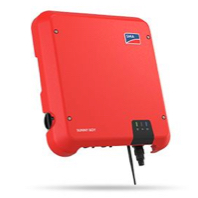
SMA Sunny Boy
Description
Read values of your SMA inverter via Modbus TCP.
Inputs and outputs · 12
| Name | Type | Unit |
|---|---|---|
| Inverter Type | Modbus | <v.1> |
| GridVoltageL1 | Modbus | V |
| GridFrequentie | Modbus | Hz |
| Power | Modbus | W |
| DailyYield | Modbus | Kwh |
| TotalYield | Modbus | Kwh |
| TotalYield Wh | Modbus | Wh |
| DC Current | Modbus | A |
| DC Voltage | Modbus | V |
| DC Power | Modbus | W |
| Heat sink temperature | Modbus | °C |
| Internal temperature | Modbus | °C |
FAQ
No questions have been answered yet.
Questions and answers
Setting up a SMA Sunny Boy inverter via Modbus TCP library.
OpenDear Sir/Madam,
I'm about to add a Sunny Boy inverter into a Loxone controlled smarthome.
I've found out this library which states that makes possible reading values of a SMA Sunny Boy inverter via Modbus TCP.
When importing the Library into Loxone Config it states that there is a new Modbus device available. And the only way I can get into it is by adding a Modbus extension in Loxone Config.
Here comes my question. Since Modbus TCP is communicating via Ethernet I understand that I do not need a Modbus Extension (which is using a RTU interface).
Therefore, how can I do to set up the SMA Sunny Boy reader via Modbus TCP if a Modbus extension is not needed?
Is it possible to have an example?
With best regards,
David Vives
1 reply
The note says "Modbus Extension, Modbus Server or a Modbus Air". If you go to Network Periphery and add a Modbus Server, then you can insert the template there.
The values are wrong
OpenHello, I have visualised the values of the registers and these values are correct. But they are not in the right context. e.g. Current in reality is 1.5 A. (with us, comma after 0) Living in Europe. Visually that then becomes 1,500.00 A bv2 : the temperature is -21212121212 °C Can I change this? It's of no use this way.
2 replies
Hello Jurgen,
what is the language of the config you are using? What is the system language of the platform the app is runing.
If the values are coming in correctly over modbus and in the app it is not correct this might have to do with a language setting of the platform the app will adapted the system language of the platform the app is running on.
Hello,
what is the language of the config you are using?
=> Loxone Config is dutch on windows pc
What is the system language of the platform the app is runing.
=> Osx, iOS is dutch
Log in to rate, comment or ask a question. Log in
Ratings and comments
No ratings or comments yet.
Log in to rate, comment or ask a question. Log in