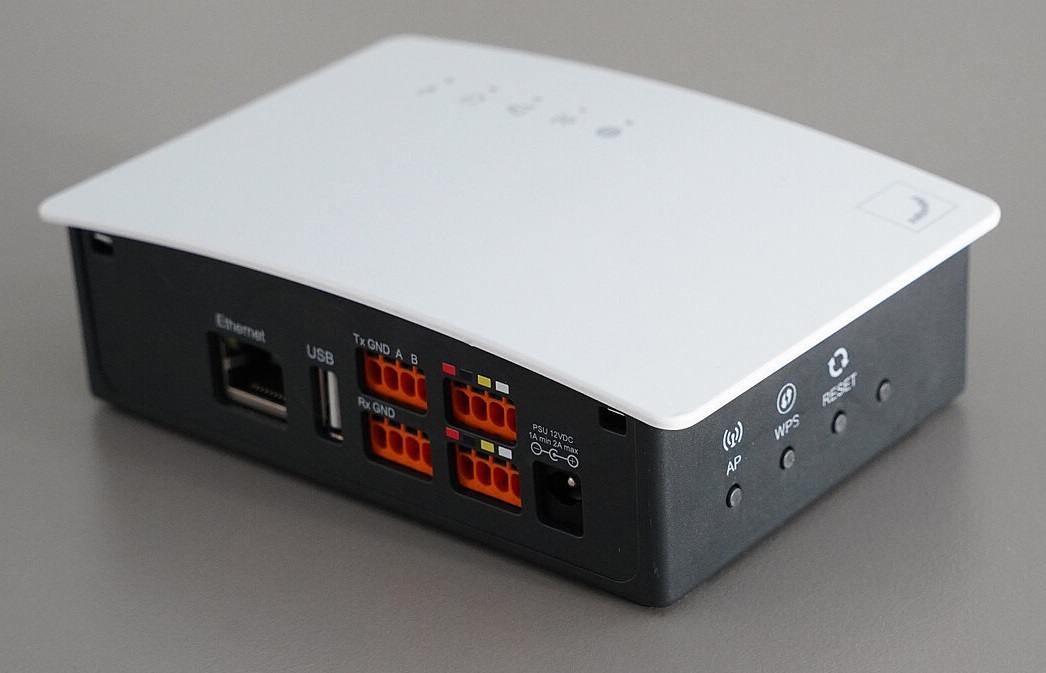
Zehnder ComfoConnect Pro
Content languageEnglish
Description
The Modbus, Internet, and app interface Zehnder ComfoConnect Pro enables the use of the Zehnder ComfoControl App. The connection to the Zehnder device is made via a wired connection through ComfoNET, and the connection to the customer's router is made via LAN or wirelessly via WiFi. Direct integration with home automation systems (e.g., SmartPlace or Loxone) is possible, as well as integration with the Zehnder Cloud.
Benefits
- Interface for global management and smart home solutions: Automation protocols (Modbus RTU/TCP), local/remote app control via cloud, and technical support. Free download of the Zehnder app (available in the AppStore and Google Play Store under "Zehnder ComfoControl"). - Compatible with a variety of Zehnder devices: Zehnder ComfoNet II devices and accessories (Zehnder ComfoAir Q, Zehnder ComfoAir Flex, Zehnder ComfoSwitch C / ComfoSense C). - Digital security: Cryptographic keys, secure cloud platform, automatic software updates.
The Loxone Template was created and tested with the Gateway Firmware v1.0.4
Hint: after the "bringing into service" wizard you need to reboot only the PRO gateway over the web interface to get proper Modbus data!
Inputs and outputs · 48
| Name | Type | Unit |
|---|---|---|
| Fehlerprotokoll | Modbus | |
| Verbindungsstatus | Modbus | <v.1> |
| Aktiver Fehler 1 | Modbus | <v.1> |
| Temperatur Profil (S) | Modbus | <v.1> |
| Temperatur Profil Modus (S) | Modbus | <v.1> |
| Raumluft Temperatur | Modbus | ° |
| Abluft Temperatur | Modbus | ° |
| Aussenluft Temperatur | Modbus | ° |
| Zuluft Temperatur | Modbus | ° |
| Fortluft Temperatur | Modbus | ° |
| Abluft Feuchte | Modbus | % |
| Zuluft Feuchte | Modbus | % |
| Fortluft Feuchte | Modbus | % |
| Aussenluft Feuchte | Modbus | % |
| Raumluft Feuchte | Modbus | % |
| Aktiver Fehler 2 | Modbus | <v.1> |
| Aktiver Fehler 3 | Modbus | <v.1> |
| Aktiver Fehler 4 | Modbus | <v.1> |
| Stufe (S) | Modbus | <v> |
| Filterstatus | Modbus | days |
| Filter tauschen | Modbus | |
| Zuluft Ventilator Volumen | Modbus | m³ |
| ComfoClime (S) | Modbus | |
| Standby | Modbus | |
| Abwesenheitsfunktion (S) | Modbus | |
| Modus (S) Auto / Manuell | Modbus | |
| Fehler zurücksetzen (S) | Modbus | |
| Stufe (S) 1 | Modbus | |
| Stufe (S) 2 | Modbus | |
| Stufe (S) 3 | Modbus | |
| Stufe (S) Abwesend | Modbus | |
| Temperatur Profil Festwert (S) | Modbus | ° |
| Party timer (S) | Modbus | |
| Party timer sec (S) | Modbus | <v.1> |
| Stufe (A) Abwesend | Modbus | |
| Stufe (A) 1 | Modbus | |
| Stufe (A) 2 | Modbus | |
| Stufe (A) 3 | Modbus | |
| Modus (A) Auto / Manuell | Modbus | |
| Temperatur Profil | Modbus | <v> |
| Temperatur Profil Modus | Modbus | <v> |
| Temperatur Profil Festwert | Modbus | <v> |
| Abwesenheitsfunktion | Modbus | |
| Stufe (A) | Modbus | <v> |
| ComfoClime | Modbus | |
| Fehler zurücksetzen | Modbus | |
| Party timer sec | Modbus | <v> |
| Party timer | Modbus |
FAQ
No questions have been answered yet.
Questions and answers
Bypass valve
OpenIs it possible to activate the bypass in Comfoair Q?
The commands in the comfoconnect library are: bypass open: comfoconnect.cmd_rmi_request CMD_BYPASS_ON bypass close: comfoconnect.cmd_rmi_request CMD_BYPASS_OFF bypass auto: comfoconnect.cmd_rmi_request CMD_BYPASS_AUTO
1 reply
the ComfoConnect PRO is working with modbus, has nothing todo with the python stuff. No there is at the moment no possibility to control the bypass.
ComfoClime Control
OpenHi,
Is it possible to control manually heating or cooling start? So how? Which register have to be used to?
- AUTO-Modus: 0 - Temperatur Profil: 1 or 2 - Temperatur Profil Modus: 2 - Externer Sollwert: my required temperature
It is right?
Thank You
Miloš
2 replies
At the moment you cannot control anything of the ComfoClime. But it is under development and hopefully comming soon.
Thank You, so and the above registers are to control what? Nothing for this moment?
Thank You
Miloš
Release complete visualization setup
Openabout the Loxone Library for the Zehnder ComfoConnect Pro – great work! You also shared a nice screenshot showing what looks like a complete visualization setup. Would you be willing to share your Loxone project file with the visualization templates included? It would be a big help to others looking to integrate Zehnder into their Loxone setup.
Thanks in advance!
No replies
ComfoConnect PRO v1.0.4 no Sensor Information
OpenIs There Anything Speical with ComfoConnect PRO v1.0.4. I Could get any Sensor Information always get 0
1 reply
everything is working with 1.0.4 too
Will it provide full integration
OpenHi Andreas At present, the integration of the Zehnder Q350 into Loxone gives more the impression of a convenient information and display system than that of a fully functional control integration. Loxone’s 'Room Ventilation Controller' function block is specifically built for controlling room ventilation and would be a great addition to the system. Is there a plan to enhance the integration to enable full control of the Zehnder Q350 through Loxone, including management of the supply and exhaust fans, bypass, cooling, and cooling / heating functions? Thank you so much and warm regards. Daniel
1 reply
Hi Daniel,
it is planned by Zehnder to add some more functions and also the Clime. When the new Modbus Registers are coming then I will immediately update the template here. We depend here on the update of Zehnder I do not know when it will come.
Kind Regards
Setup und Steuermöglichkeiten
OpenHallo Andreas,
erstmal vielen Dank für die Arbeit am Modbus-Template. Ich habe die ComfoConnect PRO vor Kurzem bei mir installiert, in der Config einen Modbus-Server angelegt und das Template importiert. Die Übermittlung der Werte klappt soweit auch, allerdings schaltet sich die Lüftung nach kurzer Zeit in den Modus "manuell" und auf "abwesend". Im Loxforum gibt es auch schon eine kurze Diskussion dazu. Ist dieser Zustand gewollt, bzw. muss die Lüftung manuell laufen, damit sie von Loxone gesteuert werden kann (so war es ja z.B. bei dem KNX-Modul)?
Falls man bei der Übernahme des Templates noch irgendetwas beachten muss, wäre es super, wenn du uns kurz aufklären kannst :)
Ansonsten wäre noch die Frage, was man zum jetzigen Zeitpunkt alles tatsächlich steuern kann (also z.B. die Lüftungsstufe in Abhängigkeit des CO2-Werts in einem Raum o.ä.).
Vielen Dank und viele Grüße,
Fabian
1 reply
Hallo Fabian,
das geht schon alles richtig. Wichtig ist wie auch bei anderen Systemen, es sollte halt nur Einer Steuern nicht beide.
Daher wenn Loxone steuert dann eher im manuellen Modus die Air betreiben, dann kommt sich nichts in die Quere.
Das einzige was sich im Moment noch nicht fixieren lässt ist der ComfoAir Bypass. Der schaltet sich nach max. 24h immer wieder auf Automatic. Ich hoffe das wird im kommenden Update aber ermöglicht.
Ansonsten alles was Ausgänge sind und im PDF beschrieben ist lässt sich auch steuern.
Ich habe viele externe Sensoren die in Loxone sind um die Lüftung mit Clime vollständig zu steuern. CO2, Feuchte, Feinstaub, Schieber, Stufen, Filter, Miele, Feueralarm, alles mögliche. Geht schon.
Bei Modbus Registern ist halt wichtig Impulse zu geben keine Dauerwerte.
mfg Andreas
ComfoAir Q and ComfoConnect KNX C
OpenGood afternoon, if we only have ComfoAir Q and ComfoConnect KNX C, will it be possible to do the integration via KNX extension?
No replies
Template
OpenHallo Andreas,
vielen Dank für das ausgearbeitete Modbus-Register. Es hat direct funktioniert und die Werte kommen korrekt an.
Hast du zufällig auch das Template für die Konfiguration zur Verfügung?
Mit freundlichen Grüßen Bas
No replies
Bypass Status auslesen?
OpenHallo, vielen Dank für die Erstellung der Vorlage. Hat super funktioniert, ich lese damit die Temperatur und Feucht für Zu- und Abluft aus (über Modbus TCP und ComfoConnect Pro von einer Q350). Ist es möglich oder zukünftig geplant, dass man auch den Status des Bypass auslesen kann? Also ob offen oder zu. Wenn von der Q350 selbst angesteuert.
1 reply
Hallo, ich habe den Feature Request für den Bypass sowie für viele weitere Themen wie auch Energiemonitoring schon früh an Zehnder gestellt, ich hoffe auch dass hier was kommen wird.
Einbindung mit LAN C Schnittstelle auch möglich?
OpenServus Andreas,
Gibt es eine Möglichkeit die Comfo Air 350 auch ohne das Comfo connect pro modul in die Loxone einzubinden? Der Kunde hat eine LAN C Schnittstelle verbaut. Leider kann mir diese Frage niemand beantworten. Deshalb die Frage an dich ( du scheinst sehr tief in der Materie zu sein)
Vielen Dank
1 reply
Hallo Johannes,
ja das geht auch mit dem LAN C mit der Lösung: https://github.com/michaelarnauts/comfoconnect Ich habe das selbst lange benutzt bis ich dann eine ComfoClime dazu bekommen habe. Dann geht das nur wenn man wirklich genau in die Tiefe vom Code schaut und das selbst noch CANBUS IDs ergänzt. (ist nicht dokumentiert)
Das Python Script muss zum einen irgendwo laufen und dann auch noch mit HTTP oder UDP Eingängen in Loxone eingebunden werden. Und das ganze wird auch nicht supportet / wer weiß ob weiterentwickelt.
Daher kann ich nur raten die 200 Euro für das Pro Gateway aus zu geben, die sind auf jeden Fall billiger als da stundenlange mit dem Python Zeugs rum zu machen und immer wieder zu pflegen.
Mit freundlichen Grüßen
English version?
OpenHello, I am looking for a Modbus integration in English. The template works, but unfortunately, I don't understand the commands - the descriptions are in German, and no units are assigned either. I thought the library was supposed to have at least a minimal English version.
Do you have a config file in English, including comments and units?
Thank you, Filip
1 reply
Hello,
only the Display Texts in the config file are in german. You need only take the PDF manual where are the words in english and rename the text. Take the Modbus Register numbers as reference.
Kind Regards Andy
Power Consumption
OpenIs there a register that outputs the current power consumption of the unit?
1 reply
no, unfortunately not, I raised already a Feature Request for that.
Zehnder ComfoConnect Pro 1.05.1
OpenGuten Tag Ich möchte über Loxone den Lüftungsfehler rücksetzen. Der Aktor "Fehler rücckesetzen" ist in der Bibliothek [IO-Adresse 0/5-Write SingleCoil (0x05)] vorhanden. Sobald ich diesen Aktor in die Loxone Logik einfüge (ohne irgendwelche Verknüpfung, wird innert ca. 10 Sek. das Fehlerprotokoll auf 1 (Sensor der Lüftung) gesetzt. Wenn man den Modbus-Monitor ansieht, zeigt sich, dass jede Minute ein "Fehler rücksetzen" gesendet wird, obwohl in der Logik nichts dergleichen eingestellt ist. Beim Entfernen des Aktors "Fehler rücksetzen" wird das Fehlerprotokoll innert ca. 1 Min. auf 0 gesetzt. Ich bitte Sie, mir bei diesem Problemfall weiterzuhelfen. Gruss und Dank Otti
2 replies
Hallo, da würde ich mal sagen am Aktor in der Loxone Config ist bei "Abstand Wiederholungen" ein Wert von 10 dann eingestellt. Den auf 0 stellen dann wird nichts mehr im Intervall gesendet.
Hallo Das hätte ich zuerst auch gedacht, aber der Wert "Abstand der Wiederholungen" ist auf 0, was gemäss Information, keine Wiederholung heisst. Im Modbus-Monitor sieht man es gut: Jede Minute wird der Wert "0" und anschliessend "ACK" gesendet. Bei einem effektive Rücksetzen anwählen, wird der Wert "65280" und ACK gesendet. Dies erstaunt mich etwas; Wieso sind dies "16-bit-unsigned integer Werte" bei einem "Write Single Coil"? Gruss und Dank Otti
English version?
OpenHello,
I am looking for a Modbus integration in English.
Is it possible to make a version available for users worldwide? Regarsd Michal
No replies
Lüftung geht auf Error nach dem MS Neustart
OpenHallo und Danke Andreas für das Template!
Leider geht bei mir bei jedem MS Neustart die Lüftung für einige Sekunden auf Fehler und bleibt dann im Automatik Modus. Gibts einen Hack bzw. ist das bei euch auch so?
Muss aktuell einfach nach jedem MS Neustart die Lüfterstufe setzen und dann bleibt sie auch. Da ich grad erst Loxone bekommen habe, gibts aktuell täglich viele Restarts.
1 reply
Hallo, ich ändere auch täglich was an meiner Programmierung, dabei habe ich aber mit MS speichern oder Reboots nie Probleme mit der Zehnder Anbindung. Bei Modbus COIL muss man halt schauen das beim initialisieren nicht gleich 0 oder 1 gesendet wird. Das bekommt man mit einem Schalter hin. Du musst vor den Modbus Coil Ausgang also der mit Register 5 einen Schalter Baustein hängen. Und du muss auch die Rückkopplung einbauen. Wenn du in der App schaltest dann soll auch Loxone umschalten und umgekehrt. Es soll kein führendes System geben. Dazu brauchst du noch einen Schalter vor dem Schalter.... Frage mich per mail dann kann ich dir en Bild schicken wie man das macht.
Log in to rate, comment or ask a question. Log in
Ratings and comments
No ratings or comments yet.
Log in to rate, comment or ask a question. Log in