Template
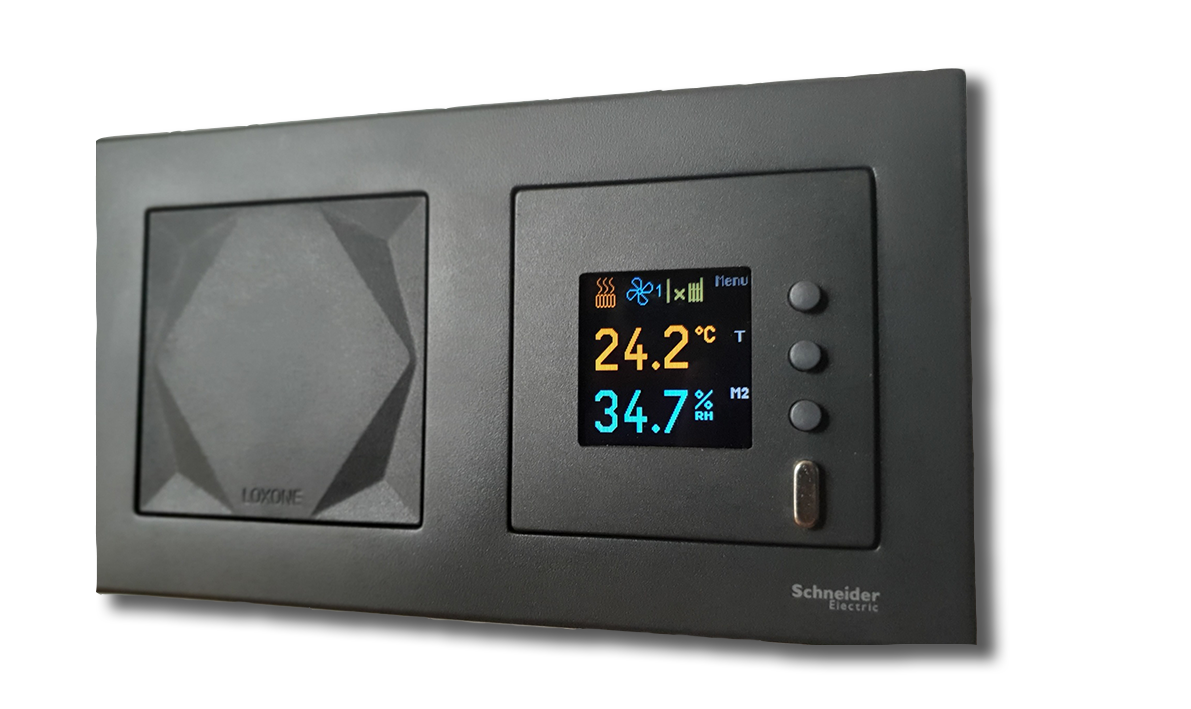
TFT display (modbus RTU protocol)
Content languageEnglish
Description
The display shows the temperature and humidity in the room, or the temperature and humidity from an external source. Each of the 163 predefined symbols in different colors can be displayed in each position. The three buttons on the display can be used to change the desired temperature or humidity, or to control Loxone system using predefined symbols. It is a piece production for any switch, for example Schneider, MERTEN M-PLAN
Inputs and outputs · 24
| Name | Type | Unit |
|---|---|---|
| 1: 0x02 Relative humidity | Modbus | <v.1> |
| 0: 0x01 Temperature | Modbus | <v.1> |
| 18: 0x19 Mode S3 | Modbus | <v.1> |
| 16: 0x17 Mode S1 | Modbus | <v.1> |
| 8: 0x09 Required temperature: | Modbus | <v.1> |
| 17: 0x18 Mode S2 | Modbus | <v.1> |
| 33: 0x34 LCD contrast | Modbus | <v.1> |
| 9: 0x10 Required humidity | Modbus | <v.1> |
| 8: 0x09 Required temperature | Modbus | <v.1> |
| 16: 0x17 Required mode 1 | Modbus | <v.1> |
| 17: 0x18 Required mode 2 | Modbus | <v.1> |
| 76: 0x77 Measured temperature offset | Modbus | <v.1> |
| 28: 0x29 Status register | Modbus | <v.1> |
| 33: 0x34 LCD contrast | Modbus | <v.1> |
| 18: 0x19 Required mode 3 | Modbus | <v.1> |
| 24: 0x25 Symbol at position 1 | Modbus | <v.1> |
| 25: 0x26 Symbol at position 2 | Modbus | <v.1> |
| 26: 0x27 Symbol at position 3 | Modbus | <v.1> |
| 37: 0x38 LCD symbol color | Modbus | <v.1> |
| 36: 0x37 LCD value color | Modbus | <v.1> |
| 6: 0x07 (User value 1) | Modbus | <v.1> |
| 7: 0x08 (User value 2) | Modbus | <v.1> |
| 39: 0x40 Bit Field (external values) | Modbus | <v.1> |
| 35: 0x36 LCD time | Modbus | <v.1> |
Ratings and comments
No ratings or comments yet.
Log in to rate, comment or ask a question. Log in