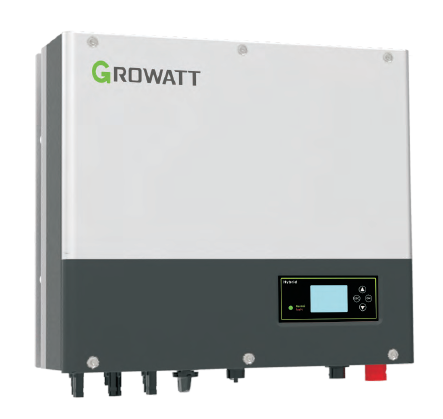
Growatt SPH TL3 BH UP
Content languageEnglish
Description
Connect your SPH type Growatt Inverter from 485-3 port (see added picture) to Loxone ModBus extension. Check settings of 9600bps, 1 stop bit and NO parity. Default Growatt ModBus address is 1.
DO NOT USE or integrate the growatt meter in your loxone ModBus data link leave the meter exclusively for your inverter to prevent uncontrolled Re-booting of your inverter.
Set Export mode to ON (growatt manual ref 6.4.4 par 6) Set rs485 setting to VPP (growatt manual ref 6.4.4 par 7)
Set AC charge to Enable and add time frame 00:00 - 23:59 (growatt manual ref 6.4.4 par 3 or via https://server.growatt.com/login settings) If Ac Charge need to be used!! Set Grid First mode to Enable and add time frame 00:00 - 23:59 (via https://server.growatt.com/login settings) If return to grid need to be used!!
The added template: Provides full energy monitoring of you inverter and storage system
Will prevent PV power to the Grid when prices are negative (negative injection price) Charge your battery during low PV Power (clouded day) and night when energy prices are low Prevent battery discharge when energy prices are low, and discharge power when prices are high AC charging will be limited by Peak load manager if required Power to Grid export during night time whe energy prices are high
Inputs and outputs · 44
| Name | Type | Unit |
|---|---|---|
| Inverter status | Modbus | <v.0> |
| Output power | Modbus | kW |
| PV energy today | Modbus | kWh |
| PV energy total | Modbus | kWh |
| Battery state of charge | Modbus | % |
| Input power from PV panels | Modbus | kW |
| Input power from PV string 1 | Modbus | kW |
| Input power from PV string 2 | Modbus | kW |
| Inverter temperature | Modbus | °C |
| Battery temperature | Modbus | °C |
| Energy to grid total | Modbus | kWh |
| Energy to grid today | Modbus | kWh |
| Battery voltage | Modbus | V |
| Charge power | Modbus | kW |
| Discharge power | Modbus | kW |
| Energy to user total | Modbus | kWh |
| Energy to user today | Modbus | kWh |
| Discharge energy today | Modbus | kWh |
| Discharge energy total | Modbus | kWh |
| Charge energy today | Modbus | kWh |
| Charge energy total | Modbus | kWh |
| Local load energy today | Modbus | kWh |
| Local load energy total | Modbus | kWh |
| AC power to user | Modbus | kW |
| AC power to grid | Modbus | kW |
| INV power to local load | Modbus | kW |
| EPS output power L1 | Modbus | kVA |
| EPS output power L2 | Modbus | kVA |
| EPS output power L3 | Modbus | kVA |
| Analoge Export limit | Modbus | <v.1> |
| Stop soc when Load mode | Modbus | <v.1> |
| ChargePower discharge | Modbus | % |
| Voltage PV1 | Modbus | <v.2> |
| Voltage PV2 | Modbus | <v.2> |
| PV1 input pwr Low | Modbus | <v.1> |
| PV2 input pwr Low | Modbus | <v.1> |
| charging enabled | Modbus | <v.1> |
| Export limit percent | Modbus | <v.1> |
| Load priority | Modbus | <v.1> |
| Charging Enable Disable | Modbus | <v.1> |
| Discharge power Rate | Modbus | <v.1> |
| Stop soc2 when discharge (grid first Mode) | Modbus | <v.1> |
| Stop soc2 when charge (Battery first Mode) | Modbus | <v.1> |
| charging power rate | Modbus | <v.1> |
FAQ
No questions have been answered yet.
Questions and answers
Loxone file not working
OpenThe loxone file is not working. if i download it i get a 0byte file.
Friendly greetings Nick
No replies
Loxone File -> 0kB
OpenDear Lieven Lagrange, I am writing to report a significant issue with the file titled "Growatt SPH BH-UO + Growatt Ark.Loxone" in the Library.
I have attempted to download the template, but the file I receive is 0 KB in size, indicating that the upload was corrupted or empty, and the file cannot be used or imported into Loxone Config.
Could you please verify the entry and re-upload a complete, working version of the file to the library?
Thank you very much for your time and effort in maintaining this entry. Best regards, Markus
No replies
load priority switching does not work
OpenHello Lieven,
First of all thank you for your work and publishing your template here. I was able to get the Modbus communication working, but switching between battery charging and discharging does not work. The inverter does not take the load priority. Do you have any idea what could be causing this?
KR Seb
No replies
Log in to rate, comment or ask a question. Log in
Ratings and comments
No ratings or comments yet.
Log in to rate, comment or ask a question. Log in