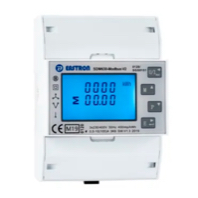
Eastron SDM630 Series
Description
The default modbus settings of the Eastron SDM630 Series meters V1, V2 & V3 are usually: ● Modbus device address = "1" ● Baudrate = "9600" ● Parity = "None" ● Stop bit = "1"
Depending on whether the meter is supplied by a different supplier, the default Modbus settings may be different. In this case, it is necessary to check the settings in the advanced settings within the Eastron SDM630 and synchronise them with the Loxone Config. This works like this:
The detailed instructions can be found in the downloads under the document "Eastron SDM630 Series V2 Manual".
See more information, datasheets, manuals etc. on the vendor's website: https://www.eastroneurope.com/products/view/sdm630modbus
Important hint: If you are using an external Modbus TCP converter, you may have to check the "Order of registers" box for the data points.
Inputs and outputs · 15
| Name | Type | Unit |
|---|---|---|
| Voltage L1 | Modbus | V |
| Voltage L2 | Modbus | V |
| Voltage L3 | Modbus | V |
| Current L1 | Modbus | A |
| Current L2 | Modbus | A |
| Current L3 | Modbus | A |
| Power L1 | Modbus | W |
| Power L2 | Modbus | W |
| Power L3 | Modbus | W |
| Total active Power | Modbus | W |
| Frequency | Modbus | Hz |
| Total Energy Import | Modbus | kWh |
| Total Energy Export | Modbus | kWh |
| Total apparent Power | Modbus | VA |
| Total reactive Power | Modbus | VAr |
FAQ
No questions have been answered yet.
Questions and answers
Einstellungen LOX / SDM630 v2
OpenHallo wir wollten den Energiezähler in die Wallbox einbauen. Alles nach Anleitung installiert , leider keine Verbindung zum Modbus.
Jetzige Einstellungen. Gerät : 3 eingestellt im gerät und Lox Baudrate : 9600 eingestellt im gerät und Lox Stop Bit: 1 eingestellt im gerät und Lox Parity: Gerade eingestellt im gerät und Lox Timeout: Auto in Lox eingestellt
Wir versuchen es morgen mal mit der normalen Modbusschnittstelle ob es an der Wallbox liegt?
Vieleicht habt ihr einen kurzen Tip für uns
1 reply
Wir haben die Default Modbus Settings in der Templatebeschreibung ergänzt.
Gruß Max Loxone
- Open
Hello,
I am successfully using this template with Wallbox air.
Now I have bought another meter and I want to connect it over Modbus TCP server Elfin-EE11 (I am already using this device with my heat pump and it works correctly).
How ever with eastron I am getting crazy numbers in loxone. I have checked the metter configuration, but it is in default -> 9600/8/none/1
I have configure the EE11 same way as I have configured loxone wallbox air modbus, but it does not work...
do you have an idea what is wrong?
thx Jakub
No replies
Parity by default 'None'
OpenHi,
per default the Meter has the Parity Setting 'None' while in the template its set as 'Straight'. This should be either noted or adapted.
Besides that it works great, no troubles so far.
br Benedikt
1 reply
We have now added notes on the default Modbus settings in the descriptions.
Best regards, Max/Loxone
Wrong values -> "Order of Registers" need to be ticked
OpenThanks a lot for the template! For me it only worked when I ticked "Order of Registers" for the values. This is consistent with the Eastron Modbus documentation. Without this I got completely crazy values.
I am using an external Modbus <-> TCP converter. Perhaps this changed things.
2 replies
Thank you for your comment, we have added the note to the description of the template.
Thank you so much Fixed my problems!
Fehler -- keine Antwort
OpenWir haben schon mehrere Stunden mit dem Elektriker investiert zwei SDM630 Modbus V2 einzurichten. Leider immer noch ohne Erfolg.
Wie kann ich am Besten bei einer Fehleranalyse vorgehen?
2 replies
Zuerst Verkabelung kontrollieren, Dann die Modbus Einstellungen ab Gerät mit den in der Loxone Config vergleichen,
Das hatten wir schon mehrfach kontrolliert. Gibt es ein Messgerät oder ähnliches? Oder kann man sich alle Nachrichten auf dem Bus anzeigen lassen? (Debugging)
How about the M-bus version - could you add it to the library?
OpenHello, we are looking to use M-bus version of this Modbus device (SDM630-MBus V2). Would you be able to provide the tempate? Best regards Lukáš Matěna, Smarteon Systems
1 reply
Hello,
For M-bus devices there is no need to provide a template. When you connect an M-bus device to the M-bus extension it will automatically add all sensors and actors the device has.
How about the M-bus version - could you add it to the library?
OpenHello, we are looking to use M-bus version of this Modbus device (SDM630-MBus V2). Would you be able to provide the tempate? Best regards Lukáš Matěna, Smarteon Systems
No replies
Log in to rate, comment or ask a question. Log in
Ratings and comments
Florian Häußler
Rated 2 of 5★★☆☆☆
Bei einigen Sensoren im Template stimmt die Wortreihenfolge nicht, da muss der Haken gesetzt werden sonst kommt bei den Werten Mist raus
Log in to rate, comment or ask a question. Log in