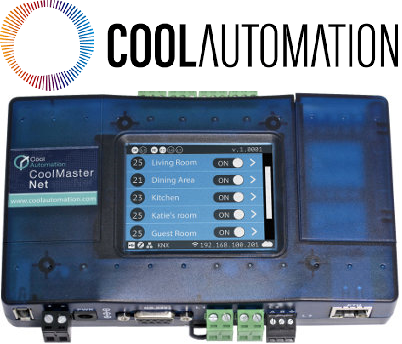
CoolMasterNet
Content languageEnglish
Description
CoolMasterNet is a device that enables seamless and universal integration of home automation and building management system with any VRF or VRV HVAC system.
Inputs and outputs · 12
| Name | Type | Unit |
|---|---|---|
| VA1 On Off | Modbus | <v.1> |
| VA2 On Off | Modbus | <v.1> |
| VA3 On Off | Modbus | <v.1> |
| VA1 Operation Mode | Modbus | <v.1> |
| VA2 Operation Mode | Modbus | <v.1> |
| VA1 Set Temp | Modbus | <v.1> |
| VA1 Fan Speed | Modbus | <v.1> |
| VA2 Set Temp | Modbus | <v.1> |
| VA2 Fan Speed | Modbus | <v.1> |
| VA3 Operation Mode | Modbus | <v.1> |
| VA3 Fan Speed | Modbus | <v.1> |
| VA3 Set Temp | Modbus | <v.1> |
FAQ
No questions have been answered yet.
Questions and answers
Sync info Loxone - Cool Master
OpenHello,
I have a Partner with a Cool Master, and he says: when turn on in Loxone, fan coil turn on, but the Cool Master haven't any register in display, and the same when he turns on in Cool Master, in Loxone haven't any register. Is correct this functionality? Why it doesn't show any register in display?
I'm waiting your response.
Best regards.
1 reply
Hello Aleix,
Are you using the RTU or TCP integration? The basic template in the library is only to control the device. So if there is a change on the device this will not be show in our system. If you want this you need to add inputs to the template so you can ask for the state.
The question why you are not seeing a change on the device and that the unit is working is best asked to the manufacturer of the device itself. If it is working than we know the communication is working and more we are not able to control.
If you want to read the sate you need to make an input on the modbus template and read the holding register of the same IO address as you are sending to.
Local Wall Controller Lock Bits ?
OpenThe "Modbus-guidelines" pdf mentions the Local Wall Controller Lock Bits, on page 11. Bit 0 - Inhibit On/Off control Bit 1 - Inhibit Mode control Bit 2 - Inhibit Set Temperature control Bit 7 - Inhibit All control operations
These are on Base Address +8.
My question : how do we write to those bits from the Loxone Config ?
2 replies
Hello, To do this, the decimal numbers (values) of the Loxone Config must be converted into binary numbers with a status block. The effort can still be acceptable for one data point. With several data points, the 8-bit Modbus communication is still very comprehensive. We therefore do not yet support this type of communication. Our Modbus communication provides 16-BIt up to 64-bit communication. Greetings Max
I'm doing a config for an office building with 45 units, so if we need to Inhibit All control operations on unit 1, then we need to write "10000000" (bit 7 set high, bits 0-6 low) to address 24.
Please explain how to send the binary word ?
Log in to rate, comment or ask a question. Log in
Ratings and comments
No ratings or comments yet.
Log in to rate, comment or ask a question. Log in