Kermi Heating & Cooling
Content languageEnglish
Description
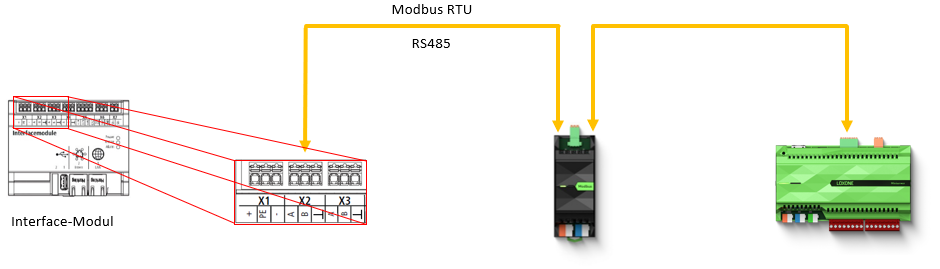
Kermi Heat pumps with the x-center pro controller can be integrated into Loxone using the Modbus RTU interface provided as standard.
Alternatively, a direct connection to an Ethernet network can be established. This allows to have access to the x-center pro controller via the Modbus TCP protocol.
__________________________________________________________________________________________________
The choice of paring Kermi Heat pumps with Loxone offers the possibility of:
- Taking advantage of dynamic electricity tariffs with the Spot Price Optimizer
- Grid management according to §14a ENWG in Germany
- Optimize the operational cycles and runtime of your Kermi heat pump
- Integration in hybrid systems e.g. Gas, Oil or PV electrical heaters
- Being able to combine hybrid solutions e.g. Heatpump and PV- Heating element in your Hot Water Storage
- In order to comply with local requirements of your government, define e.g. yearly operation goals like certain annual runtime forces for hybrid systems e.g. (Heatpump 60% amount of energy, Gas heater 40% amount of energy)
- Demand-based heating and cooling based on e.g. presence or the protection of open windows
- Active integration in interaction with e.g. PV- systems in a Loxone Energy Management
- Access to statistics or individual notifications
- Design your own personalized schematics
- Controlling the hot water circulation pump based on signals from presence detectors.
- Enhanced safety and security through leakage detection or activation of IP cameras in the facility room
Our step by step manual guides you through collecting heating or cooling demand and forwarding it to the x-center pro controller, ensuring seamless interaction between individual room controls and Kermi's central heating/cooling system.
Please take a look on the Loxone Config sample file in the Library download area.
_____________________________________________________________________________________________
Structure:
Modbus RTU:
Modbus TCP:
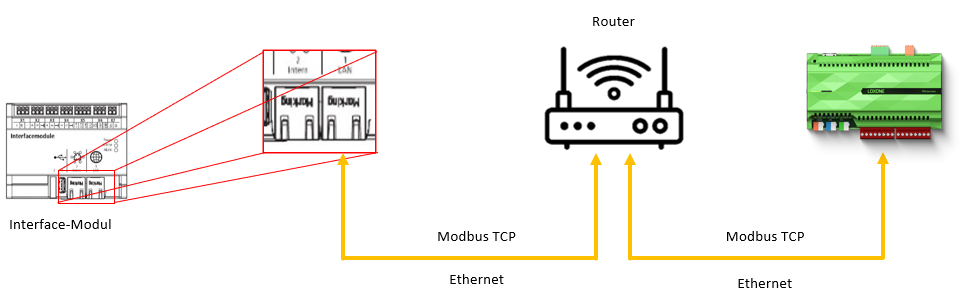
The connection of the x-center pro controller to your device is made via the Interface-Modul. Depending on your Kermi product, the Interface-Modul can be in different locations (see manual of the product).
__________________________________________________________________________________________________
Kermi helpdesk, downloads and activation of Modbus:
- In addition to the data points of the use case, a complete list of the German data points and an German interface description can be downloaded here as well as in the download area.
- To activate Modbus TCP as well as Modbus RTU on the heat pump or if you have general questions, please get in contact with our Kermi service team.
- Phone number: +49 9931 501 12004
- Email: [email protected]
- Homepage (German service contact form): Wärmepumpe | Kermi (New service case)
__________________________________________________________________________________________________
Example UseCase: Integration of x-center pro controller:
Residential building with heating, warm water storage and heating circuit.
- Device Air/Water Heat pump x-change dynamic pro
- Warm water storage tank --> Controlled by Loxone
- Heating/Cooling Buffer
- Mixing circuit heating/cooling HC1 & HC2 --> Controlled by Loxone
Every system is individual depending on the project.
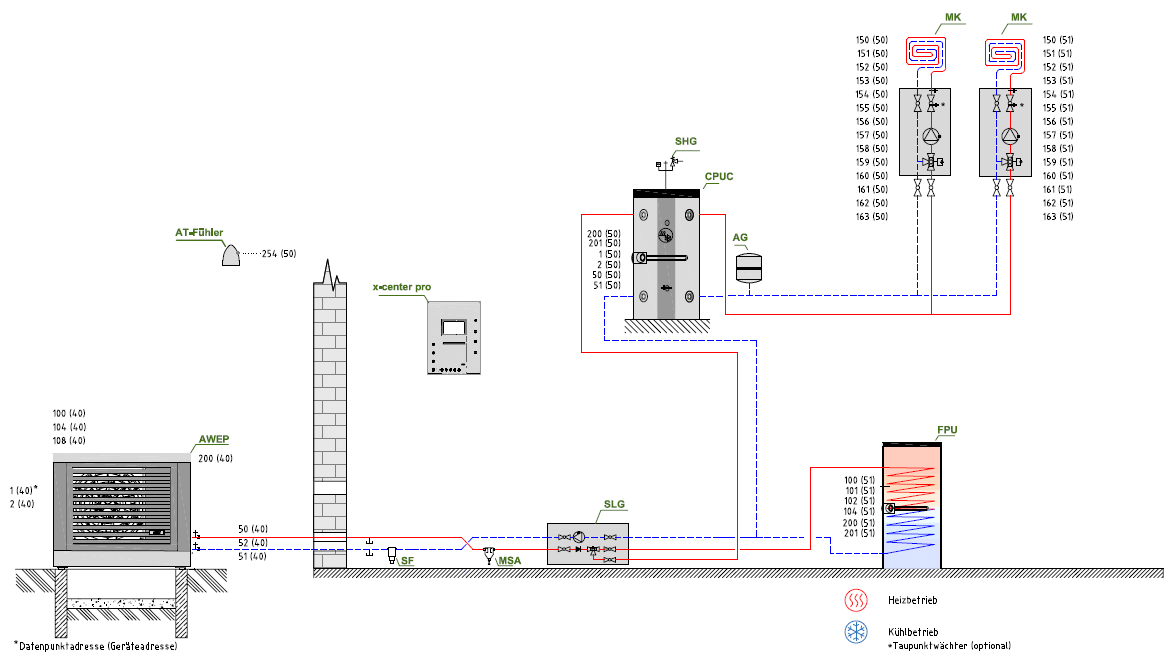
*Data point address (device address)
Inputs and outputs · 30
| Name | Type | Unit |
|---|---|---|
| Actual Heatpump Source Supplyflowtemperature (OUT) | Modbus | |
| Actual Heatpump Source Backflowtemperature (IN) | Modbus | |
| Actual Outdoortemperature | Modbus | |
| Actual Heatpump Supplyflowtemperature | Modbus | |
| Actual Heatpump Backflowtemperature | Modbus | |
| Actual Heatpump Flow | Modbus | |
| Actual COP | Modbus | |
| Actual COP Heating | Modbus | |
| Actual COP Hot Water | Modbus | |
| Actual COP Cooling | Modbus | |
| Actual Thermal Power Total | Modbus | |
| Actual Thermal Power Heating | Modbus | |
| Actual Thermal Power Hot Water | Modbus | |
| Actual Thermal Power Cooling | Modbus | |
| Actual Electrical Power Total | Modbus | |
| Actual Electrical Power Heating | Modbus | |
| Actual Electrical Power Hot Water | Modbus | |
| Actual Electrical Power Cooling | Modbus | |
| State Operatinghours Fan | Modbus | |
| State Operatinghours Hot Water Circulationpump | Modbus | |
| State Operatinghours Compressor | Modbus | |
| State Heatpump Operationstate | Modbus | |
| State Heatpump Fault | Modbus | |
| State PV Modulation | Modbus | |
| Actual Thermal Power PV Mode | Modbus | |
| State Targettemperature Heating PV Operatingmode | Modbus | |
| State Targetttemperature Hot Water PV Operatingmode | Modbus | |
| Heating Targettemperatur PV Modulation | Modbus | |
| Hot Water Targettemperatur PV Modulation | Modbus | |
| Actual PV Power | Modbus |
FAQ
No questions have been answered yet.
Questions and answers
Pro?
OpenFunktioniert das nur mit der Pro ? Habe die x-change dynamisch 16 AW-E also ohne pro. Kann ich das Template trotzdem nutzen ? Danke und Gruß
1 reply
Sehr geehrter Herr Jordan,
das Template funktioniert nur mit Wärmepumpen der „pro“-Baureihe, d.h.:
- x-change dynamic pro ac 6 AW E - x-change dynamic pro ac 10 AW E - x-change dynamic pro ac 16 AW E - x-change dynamic pro M AW E - x-change dynamic pro L AW E
Wärmepumpen älterer Generation (ohne „pro“) werden nicht unterstützt. Bei weiteren Fragen können Sie gerne sich an unser Serviceteam wenden: https://www.kermi.com/de/de/raumklima/kundendienst-raumklima/waermepumpe/
Viele Grüße, Kermi Online-Team
Log in to rate, comment or ask a question. Log in
Ratings and comments
No ratings or comments yet.
Log in to rate, comment or ask a question. Log in